Week 1: Sockets and Packet Delay
#Activity
#1.1 - Activity
SSH in using ssh [email protected] -p 5000 and password isfun. Once connected, you will be dropped into a custom shell where you can run various networking related syscalls. Use it to connect to 10.0.1.X port 1111, where X is 1 for Discussion 1A, 2 for Discussion 1B, and 3 for Discussion 1C, and follow the instructions sent to you on connection!
If you do not have SSH installed locally, you can go to https://shell.cloud.google.com, login with your UCLA account, and use the Linux machine terminal provided to SSH in instead.
#1.2 - Activity
Continue with context from the previous activity.
#1.3 - Activity
Continue with context from the previous activity.
#1.4 - Activity
Continue with context from the previous activity.
#Packet Delay
#Packet Delay 1
This is the first question in a series of questions using this same scenario:
Consider a linear packet-switched network with 3 nodes, A, B, and C. Assume that a packet must be fully received by a node before it can begin to be forwarded. 3 packets are sent from node A to node C via node B. Packets have a size of 1000 bytes, and the propagation delay of both links is 3 ms. Between A and B, the transmission rate is 1 Mbps, and between B and C, the transmission rate is 5 Mbps. For the purposes of this problem, 1 Mbps = 1,000,000 = 10^6 bits per second, and assume that node A begins transmitting the first packet at time t = 0 ms.
How much time (in ms) does it take for the first packet to be fully sent by node A? Give just a number, like 42.
#Packet Delay 2
Consider a linear packet-switched network with 3 nodes, A, B, and C. Assume that a packet must be fully received by a node before it can begin to be forwarded. 3 packets are sent from node A to node C via node B. Packets have a size of 1000 bytes, and the propagation delay of both links is 3 ms. Between A and B, the transmission rate is 1 Mbps, and between B and C, the transmission rate is 5 Mbps. For the purposes of this problem, 1 Mbps = 1,000,000 = 10^6 bits per second, and assume that node A begins transmitting the first packet at time t = 0 ms.
How much time (in ms) does it take for the first bit of the first packet to be received by node B?
#Packet Delay 3
Consider a linear packet-switched network with 3 nodes, A, B, and C. Assume that a packet must be fully received by a node before it can begin to be forwarded. 3 packets are sent from node A to node C via node B. Packets have a size of 1000 bytes, and the propagation delay of both links is 3 ms. Between A and B, the transmission rate is 1 Mbps, and between B and C, the transmission rate is 5 Mbps. For the purposes of this problem, 1 Mbps = 1,000,000 = 10^6 bits per second, and assume that node A begins transmitting the first packet at time t = 0 ms.
How much time (in ms) does it take for the last byte of the first packet to be received by node B?
#Packet Delay 4
Consider a linear packet-switched network with 3 nodes, A, B, and C. Assume that a packet must be fully received by a node before it can begin to be forwarded. 3 packets are sent from node A to node C via node B. Packets have a size of 1000 bytes, and the propagation delay of both links is 3 ms. Between A and B, the transmission rate is 1 Mbps, and between B and C, the transmission rate is 5 Mbps. For the purposes of this problem, 1 Mbps = 1,000,000 = 10^6 bits per second, and assume that node A begins transmitting the first packet at time t = 0 ms.
How much time (in ms) does it take for the last packet to be fully sent into the wire by node A?
#Packet Delay 5
Consider a linear packet-switched network with 3 nodes, A, B, and C. Assume that a packet must be fully received by a node before it can begin to be forwarded. 3 packets are sent from node A to node C via node B. Packets have a size of 1000 bytes, and the propagation delay of both links is 3 ms. Between A and B, the transmission rate is 1 Mbps, and between B and C, the transmission rate is 5 Mbps. For the purposes of this problem, 1 Mbps = 1,000,000 = 10^6 bits per second, and assume that node A begins transmitting the first packet at time t = 0 ms.
Yes/No: Do packets queue up at node B? In other words, when node B transmits packet 1, does it already have the entirety of packet 2 stored and ready to transmit before node B finishes transmitting packet 1?
Enter in exactly the text “yes” or “no”.
#Packet Delay 6
Consider a linear packet-switched network with 3 nodes, A, B, and C. Assume that a packet must be fully received by a node before it can begin to be forwarded. 3 packets are sent from node A to node C via node B. Packets have a size of 1000 bytes, and the propagation delay of both links is 3 ms. Between A and B, the transmission rate is 1 Mbps, and between B and C, the transmission rate is 5 Mbps. For the purposes of this problem, 1 Mbps = 1,000,000 = 10^6 bits per second, and assume that node A begins transmitting the first packet at time t = 0 ms.
At what time does node B finish transmitting packet 3?
#Packet Delay 7
Consider a linear packet-switched network with 3 nodes, A, B, and C. Assume that a packet must be fully received by a node before it can begin to be forwarded. 3 packets are sent from node A to node C via node B. Packets have a size of 1000 bytes, and the propagation delay of both links is 3 ms. Between A and B, the transmission rate is 1 Mbps, and between B and C, the transmission rate is 5 Mbps. For the purposes of this problem, 1 Mbps = 1,000,000 = 10^6 bits per second, and assume that node A begins transmitting the first packet at time t = 0 ms.
At what time does node C fully receive packet 3?
#Packet Delay 8
Challenge: Consider a linear packet-switched network with 3 nodes, A, B, and C. Assume that a packet must be fully received by a node before it can begin to be forwarded. 3 packets are sent from node A to node C via node B. Packets have a size of 1000 bytes, and the propagation delay of both links is 3 ms. Between A and B, the transmission rate is 1 Mbps, and between B and C, the transmission rate is 5 Mbps. For the purposes of this problem, 1 Mbps = 1,000,000 = 10^6 bits per second, and assume that node A begins transmitting the first packet at time t = 0 ms.
Historically, data was transferred over the phone line network, where a dedicated circuit-connected connection was made between any 2 callers who wanted to connect to each other. As such, an intermediate node did not need to receive the entire “packet” of data before forwarding it to the next one-it just streamed the data to a predetermined destination. Ignoring any delay that a router might have between receiving a bit and sending out the bit, what percentage of time is “wasted” due to the store-and-forward processing of packets compared to this circuit-switched network using a streaming processing? Answer as a 2-digit number representing the percentage, rounded to the nearest percent.
#Packet Delay 9
Now, let’s keep everything the same, except we are now sending from node C to node A. The updated portions of the description are bolded:
Consider a linear packet-switched network with 3 nodes, A, B, and C. Assume that a packet must be fully received by a node before it can begin to be forwarded. 3 packets are sent from node C to node A via node B. Packets have a size of 1000 bytes, and the propagation delay of both links is 3 ms. Between A and B, the transmission rate is 1 Mbps, and between B and C, the transmission rate is 5 Mbps. For the purposes of this problem, 1 Mbps = 1,000,000 = 10^6 bits per second, and assume that node C begins transmitting the first packet at time t = 0 ms.
How much time does it take for 3 packets to be sent from node C back to node A?
#Packet Delay 10
Challenge: Notice how the time it takes to send all 3 packets from node A to node C, or node C to node A, is the exact same, despite the fact that the link transmission speeds are different. Why is this the case?
Note that points for this question are manually granted, and are not automatic.
#Protocol Layers
#Protocol Layers 1
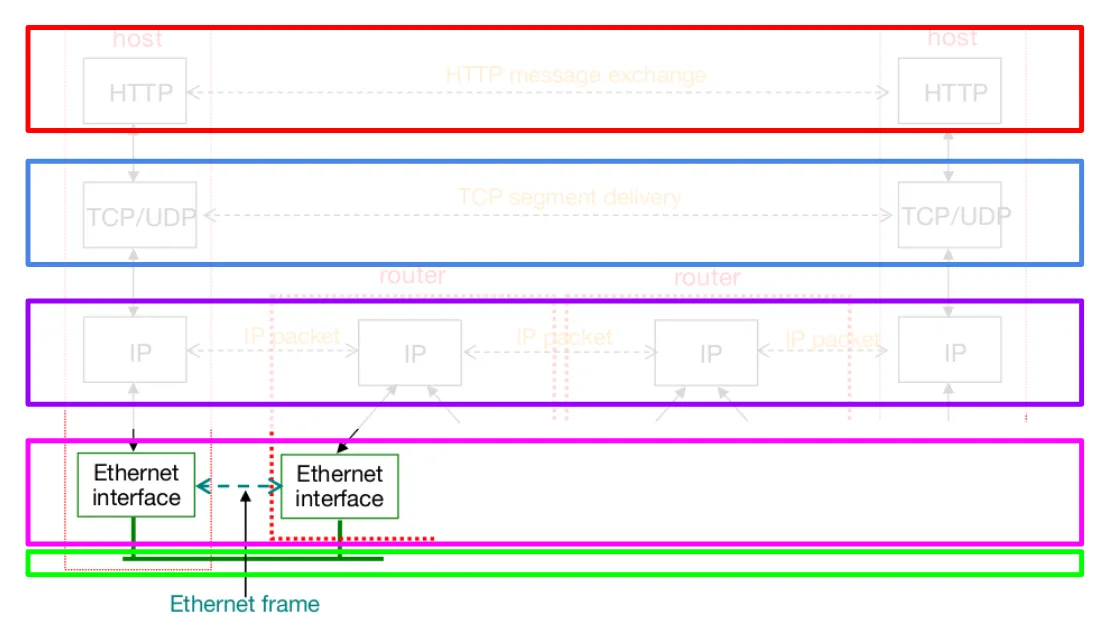
The host on the left is trying to send an HTTP message to the host on the right.
Write down the names of the protocol layers involved as an HTTP message is passed to the Ethernet interface of the first host. Use the first letter of the protocol layer in a list. For example, if you believe the answer is (apple, orange, kiwi), answer “a,o,k”.
#Protocol Layers 2
When the HTTP message reaches the first router, what are the layers that it passes before a routing decision is made?
#Protocols
#Protocols 1
Which of the following protocols are used if I logged into gmail.com and sent an email to my friend? Answer as a sorted, comma separated list, like 1,2,3.
- FTP
- SMTP
- SIP
- DASH
- HTTP
- STIR/SHAKEN
#Sockets
#Sockets 1.1
I would like to set up a TCP server, listening on port 8080 for any incoming connections, but not actually make any connections. In what order should I run the following syscalls, if needed? Answer in a comma-separated list, like cats,dogs,fish.
- socket
- bind
- listen
- accept
- connect
- send
- sendto
- recv
- recvfrom
#Sockets 1.2
My TCP server is already listening on port 8080. Which of the following syscalls, and in what order, can I use to receive some data from the next incoming connection, and then send some data back? Answer in a comma-separated list, like cats,dogs,fish.
- bind
- listen
- accept
- connect
- send
- sendto
- recv
- recvfrom
#Sockets 2
I would like to set up a TCP client, connecting to a server on port 8080 at 127.0.0.1, and sending an HTTP GET request and reading the response. In what order should I run the following syscalls, if needed? Answer in a comma-separated list, like cats,dogs,fish.
- socket
- bind
- listen
- accept
- connect
- send
- sendto
- recv
- recvfrom
#Sockets 3
I would like to set up a UDP server, listening for any incoming UDP datagrams on port 8080, and reading the data of the first received UDP datagram. In what order should I run the following syscalls, if needed? Answer in a comma-separated list, like cats,dogs,fish.
- socket
- bind
- listen
- accept
- connect
- send
- sendto
- recv
- recvfrom
#Sockets 4
I would like to set up a UDP client, sending a datagram to port 8080 on 127.0.0.1. In what order should I run the following syscalls, if needed? Answer in a comma-separated list, like cats,dogs,fish.
- socket
- bind
- listen
- accept
- connect
- send
- sendto
- recv
- recvfrom
#Unit Conversion
#Unit Conversion 1
Convert 120 Kbps to gigabytes per 2/3rds of a day (since we are sleeping the other 1/3rd of the day). Use 10^3 when converting between units such as megabytes and kilobytes, not 2^10.