Project 2
Reliable Data Transport - Due 11:59pm Monday, May 18 (Week 8)
#Quick Links
#Overview
In this project, you will implement a reliable data transport (RDT) protocol in C. You will implement the elements of reliable data transport you learned from class that can withstand
- Dropped packets
- Reordered packets
Your implementation will communicate over UDP and provide reliable delivery to the application layer, similar to how TCP provides reliability over IP.
#Architecture
Your client and server will follow a layered architecture:
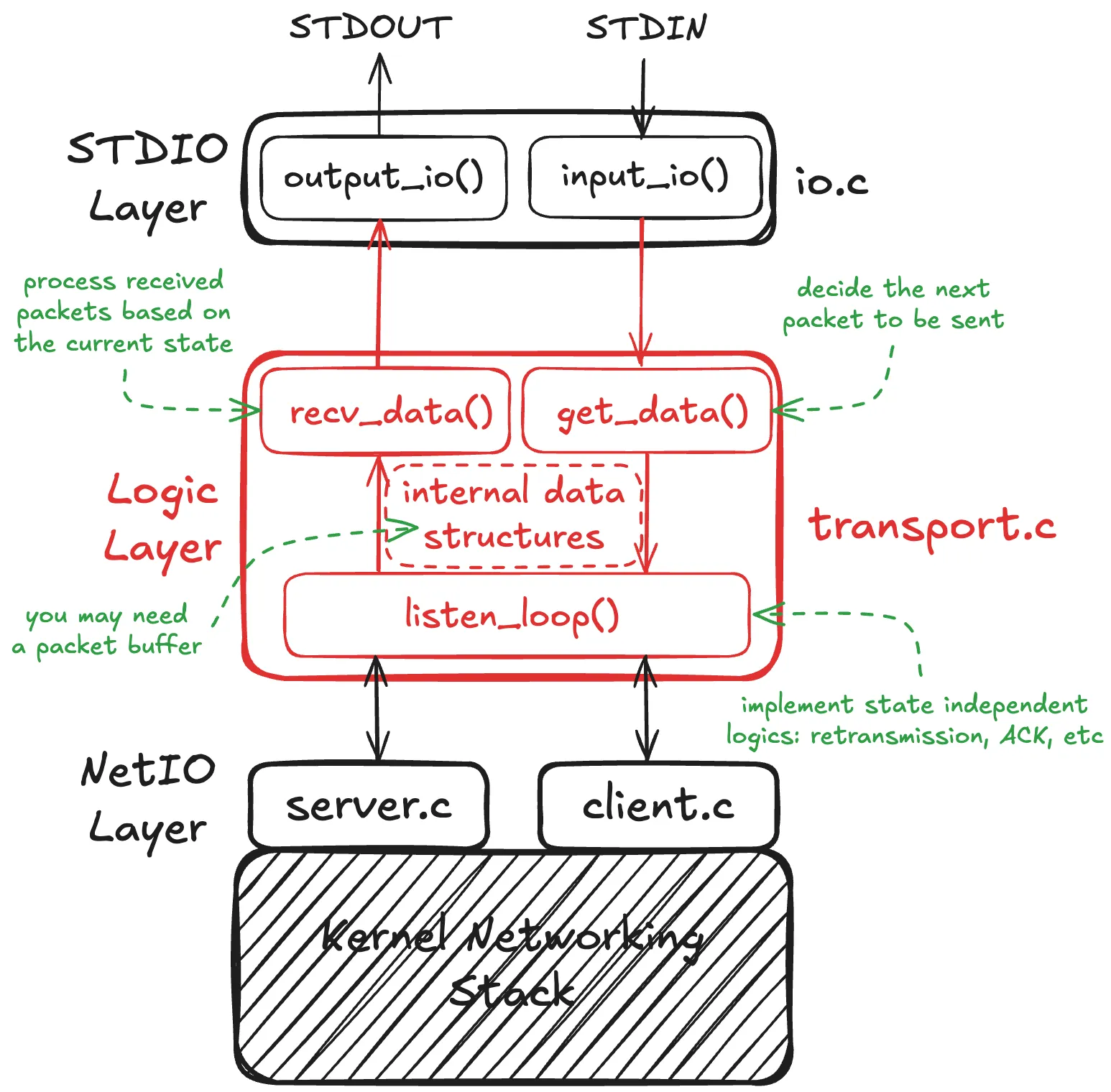
#Notices
- If you’re using GitHub or a similar tool to track your work, please make sure that your repository is set to private.
- As per the syllabus, the use of AI assisted tools is not allowed.
- You may do this project in groups of up to 3 people. Please remember to include your whole group in your gradescope submission.
#Submission
Submit a ZIP file to Gradescope by 11:59pm on Monday, May 18th. Late submission is allowed until Wednesday, May 20th (10% deduction per day).
The helper zip command creates a compatible ZIP file.
#Grading Criteria
The autograder runs 17 tests for a total of 100 points.
The grader runs your client and server and checks to see whether the input to one is in the output of the other. You should keep debug statements to stderr for that reason.
| Test | Points |
|---|---|
| Compilation | 4 |
| Small file (10 KB) - Baseline | 6 |
| Small file (10 KB) - Drop (5%) | 6 |
| Small file (10 KB) - Reorder (100%) | 6 |
| Small file (10 KB) - Drop + Reorder | 6 |
| Medium file (100 KB) - Baseline | 6 |
| Medium file (100 KB) - Drop (5%) | 6 |
| Medium file (100 KB) - Reorder (100%) | 6 |
| Medium file (100 KB) - Drop + Reorder | 6 |
| Large file (500 KB) - Baseline | 6 |
| Large file (500 KB) - Drop (5%) | 6 |
| Large file (500 KB) - Reorder (100%) | 6 |
| Large file (500 KB) - Drop + Reorder | 6 |
| Ginormous file (2 MB) - Baseline | 6 |
| Ginormous file (2 MB) - Drop (5%) | 6 |
| Ginormous file (2 MB) - Reorder (100%) | 6 |
| Ginormous file (2 MB) - Drop + Reorder | 6 |
#Test Conditions
Each file size has four test scenarios:
- Baseline: No packet loss or reordering
- Drop (5%): 5% of packets are dropped
- Reorder (100%): All packets are reordered (sent out of order)
- Drop + Reorder: 5% packet loss combined with 100% reordering
#Compilation Requirements
Your submission must:
- Include a
Makefilethat buildsclientandserverexecutables
#Running Tests Locally
Since running all tests may take a long time, you we highly recommend running individual test categories using the helper script:
./helper test compile   # Run compilation test only
./helper test small    # Run small file (10 KB) tests only
./helper test medium   # Run medium file (100 KB) tests only
./helper test large    # Run large file (500 KB) tests only
./helper test ginormous # Run ginormous file (2 MB) tests only
You can also run tests by condition across all file sizes:
./helper test baseline      # All baseline tests (no loss/reorder)
./helper test drop         # All drop tests (5% packet loss)
./helper test reorder      # All reorder tests (100% reordering)
./helper test drop_reorder # All drop + reorder tests
Run ./helper without arguments to see all available commands.